
If you are searching for the best karaoke software and tools, then you have landed at the right place.
This blog has covered the five best karaoke players options for 2026, which will provide you with the ultimate karaoke experience right on your Mac or Windows device.
Table of Contents
What is Karaoke software 2026?
Karaoke software is intended to offer you a platform that allows you to view the lyrics on a separate screen. In addition, it will convert songs without lyrics into songs with background music that you can sing along to. Since its beginning in the 1970s, karaoke has been a popular choice among party-goers.

Benefits of Karaoke software 2026
- Showcase your talent
- Boosts self-esteem
- Allows you to interact with others
- Enhances your memory
- Reduces stress
- It helps to express feelings and emotions
What is the Best Karaoke Software in 2026? / List of Best Karaoke Players of 2026 (Free & Paid)
- PC DJ Karaoki
- LYRX Karaoke Software
- KaraFun Player
- Karaoke Surgeon 2
- Kanto Karaoke
- Karaoke Builder Player 5.0
Best Karaoke Software: An Overview (2026)
Here’s a quick overview of all the listed professional karaoke software.
| Best Karaoke Software | Key Takeaway |
| PC DJ Karaoki | Most Recommended Karaoke Software |
| LYRX Karaoke Software | Professional and Easy-to-Use Karaoke Software |
| KaraFun Player | Budget-Friendly Karaoke Software |
| Karaoke Surgeon 2 | 5 Modules, 1 Great Product |
| Kanto Karaoke | Best Karaoke Software for PC |
In a hurry?
We recommend our top picks to save you time:
All the above mentioned karaoke software are trusted, secure and in high demand.
#1. PC DJ Karaoki – Most Recommended Karaoke Software
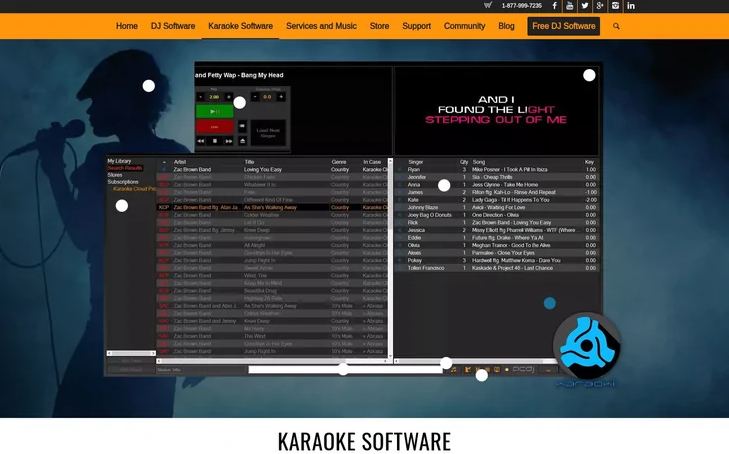
To simply organise and manage your karaoke concerts, use this powerful karaoke software player, that raises the bar for karaoke hosting. This Karaoke tool supports WAV+G, MP3+G, Cloud Pro, MP3+G / WAV+G, and other video files.
Furthermore, PCDJ is one of the most recommended and professional karaoke software that is designed for the modern karaoke venues and karaoke host. You can conduct karaoke performances more quickly and easily with the help of PCDJ Karaoki’s excellent automated singer rotation list with singer history, news ticker, key control, next singers screen, filler music player, song book exporter and printer, and many other features.
We highly recommend PCDJ as the best professional karaoke software 2026 if you’re looking to host karaoke nights and mix audio files and music videos on a MAC computer or Windows PC.
Features of PC DJ Karaoki
- Smart Track Scanning: This feature lets you easily scan and organise your karaoke tracks using standard MP3 tags (all versions supported) or file naming conventions.
- Automated Singer Rotation: Manage your karaoke nights seamlessly with its advanced vocalist rotation, singer history and a dedicated next-singer screen display.
- Cloud Integration & Easy Loading: Access your favorite libraries via cloud integration and use the simple drag-and-drop feature to load tracks instantly into the player.
- Advanced Customisation: With its advanced customisation feature, you can easily personalise your karaoke setup with custom colour settings, a secure lock screen feature and comprehensive screen display controls.
- Fundamental Commands: This karaoke software comes packed with all the standard and essential commands you need to host a successful professional karaoke event.
Pricing of PC DJ Karaoki
- 14-Day Free Trial: It offers a fully functional 14-day free trial, so you can easily explore its features and test the software before making a purchase.
- Full License: You can get this karaoke software for a one-time payment of $99. This lifetime purchase includes free updates, a license for up to 3 computers and various unique features like full multimedia support, a news ticker, essential controls and much more.
#2. LYRX Karaoke Software – Best Karaoke Software for Mac & Windows
Another excellent karaoke player on our list is LYRX. It is one of the most popular and easy to use karaoke hosting software designed especially for Mac devices. In addition, LYRX is also compatible with Windows devices.
We discovered that it has the right features for both professional and beginner karaoke users. Plus, it’s more affordable than its alternatives.
You can import songs from your hard drive to
LYRX allows you to easily import songs from your hard drive, making a searchable database. You can swiftly find and add songs to the singer rotation or send them directly to the player using the search-as-you-type feature.
We highly recommend LYRX Karaoke Software as the professional karaoke software for both MAC and Windows.
Features of LYRX Karaoke Software
- Advanced Audio Controls: Enjoy professional tools like key control, key detection and independent tempo adjustments to perfectly match the singer’s vocal range.
- Singer & Song History: Easily manage your karaoke nights by keeping track of previous performances with its built-in singer and song history log.
- Mic Support & Recording: Connect your microphone directly to the software and record your live vocal performances effortlessly.
- Custom Visual Overlays: Enhance the screen experience for your audience by creating beautiful, multi-layered video, text and image overlays.
- Automatic Filler Music: Keep the party energy high! The automatic filler music player seamlessly plays background tracks between singers to avoid awkward silences.
- Built-in Karaoke Store: Directly browse, purchase and download new tracks from its in-built karaoke song store without leaving the software.
- Kill Vocal Feature: Easily remove or mute the lead vocals from standard audio tracks to create your own instant karaoke versions.
- Massive File Management: LYRX is highly optimized karaoke software that allows you to import, search and manage a massive database of over 1,000,000 files without any lag.
- Broad Format Support: This karaoke player supports almost all popular karaoke and video file types, including Zipped MP3+G, MP3+G, MKV, MP4, DIVX, AVI, MOV and more.
Pricing of LYRX Karaoke Software
The pricing of LYRX karaoke software is $79.95.
#3. KaraFun Player – Budget-Friendly Karaoke Software
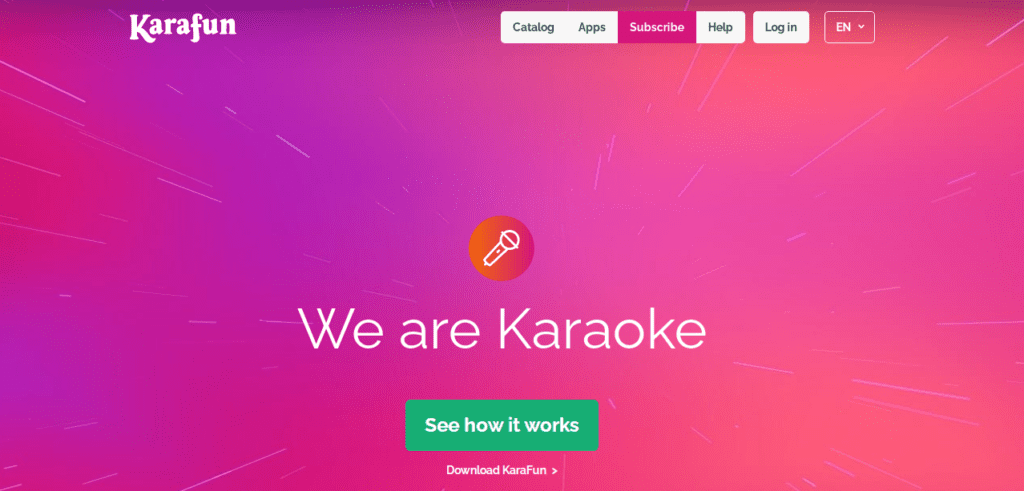
If you’re looking for karaoke software that can meet all of your demands and function efficiently, then this software is for you. KaraFun is a fantastic software that works on every platform, including PCs, tablets, smartphones, and even smart TVs. Aside from that, it works with all major operating systems, including Windows, iOS, and Android.
Features of KaraFun Player
- Massive Song Library: KaraFun offers a constantly growing library of tens of thousands of high-quality karaoke tracks. All these tracks are recorded in professional studios.
- Dual Display Mode: With just a simple click, you can activate an extra karaoke window and easily move it to your external monitor, smart TV or video projector.
- Offline Syncing: Don’t have an internet connection? No problem! KaraFun allows you to sync your favorite tunes offline so you can easily keep the party going anywhere.
- Custom File Support: Along with its included membership library, KaraFun can also play your own personal karaoke files. Furthermore, it supports various formats like CD+G, MPEG, KAR, MID and more.
- Custom Playlists: You can easily create, manage and save all your favorite karaoke tracks into personalised playlists for quick and easy access during your karaoke sessions.
Pricing of KaraFun Player
- Free Version: KaraFun offers its free version for downloading to explore its interface. In its free version, you can get access to 30-second samples of each song and a limited selection of full-length free songs.
- Premium Subscription: You can get this plan at $9.99/month. In this plan, you can enjoy ad-free and unlimited access to their entire song catalog, offline syncing and the ability to create custom playlists. Note: You can cancel this subscription anytime.
- Pro Subscription (For Commercial Use Only): This plan will cost you $49.99/month. In this pro plan, you can access all its Premium features plus a commercial license, a permanent QR code and advanced interface customisation for public events and venues.
- Gift Cards: For those who don’t want to purchase a monthly subscription, KaraFun offers one-time gift card options so you can enjoy karaoke on your own terms without auto-renewal.
#4. Karaoke Surgeon – Best Karaoke Software for Mac and Windows
Karaoke Surgeon 3 is a revolutionary 5-in-1 karaoke tool designed for both beginners and professionals. It is a complete package of different modules such as Recording, Editing, File Conversion, Karaoke Creation and Vocal Removal.
Karaoke Surgeon will save you time and money while providing you with much better audio quality. It is a highly recommended investment and if you want to test the software before purchasing, you can enjoy their fully functional 4-hour free demo version. Furthermore, they offer a solid 60-day, no-questions-asked money-back guarantee which makes it a completely risk-free choice for your karaoke needs.

Features of Karaoke Surgeon
- Broad File Compatibility: Karaoke Surgeon can easily open and play the most common audio, video and karaoke file formats used by professional karaoke artists.
- Real-Time Key & Tempo Adjustment: You can effortlessly alter the pitch (key) and speed (tempo) of your files in real-time to perfectly match the singer’s voice.
- Formant Preservation: When applying major key changes to voice audio, it uses advanced formant preservation to lessen or completely eliminate the unnatural “chipmunk” sound.
- Distortion-Free Audio: This karaoke player employs high-quality audio algorithms to ensure clear, distortion-free sound even after significant key or tempo modifications.
- Audio Editing Capabilities: It lets you easily edit the track length which allows you to seamlessly add or remove specific sections like the chorus or verse.
- Karaoke File Creation: Beyond just playing files, this karaoke tool allows you to author and create your very own custom karaoke tracks from scratch.
- Sing, Record & Share: With Karaoke Surgeon, you can sing along, record your live karaoke performances and easily share them with others.
- Lead Vocal Removal: This karaoke hosting player also allows you to extract or remove lead vocals from standard audio tracks to create instant backing tracks.
- Bulk File Conversion: You can save your precious time and effort by converting multiple karaoke files into different formats simultaneously with its powerful bulk conversion feature.
Pricing of Karaoke Surgeon
- Free Demo Version: It offers a fully functional 4-hour free demo version which allows you to test the product and its features before even making a purchase.
- Karaoke Surgeon for Windows: You can get this plan for $119.95. It includes a two-machine license for the same operating system and comes with one year of free technical support.
- Karaoke Surgeon for Mac: Available at $119.95, this plan also provides a two-machine license for Mac devices along with free support for one year.
- Money-Back Guarantee: Karaoke Surgeon also offers a 60-day, no-questions-asked, money-back guarantee if you are not satisfied with the product.
#5. Kanto Karaoke – Best Karaoke Software for PC
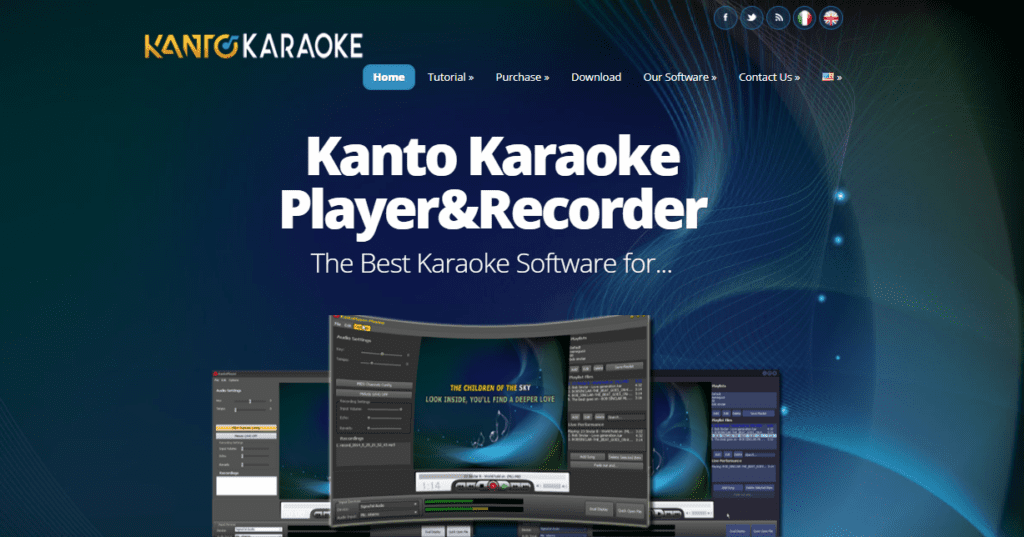
Kanto Karaoke is recognized to accept virtually all video and multimedia formats currently accessible, including all popular formats such as KAR, MP3, and others. As a result, it’s one of the most fantastic karaoke software available, and it’s specifically designed for Windows and Mac devices. The best thing is that it has a slew of features. Furthermore, it allows you to record your voice as you sing, as well as your performance.
Features of Kanto Karaoke
- Unique Crossfade Effect: Kanto Karaoke is the ONLY karaoke player with a CROSSFADE effect that helps to switch from one track to another (it decreases the volume of the stopped song and increases at the same time the magnitude of the new song selected). This way, you won’t have to change music as frequently.
- High-Quality SoundFont: Kanto Karaoke’s inbuilt SoundFont delivers the most incredible playing quality for mid/jar files. You may also modify the SoundFont file from the program’s options menu to adjust the sound quality.
- Midi Channels Config: This feature lets you examine and toggle any midi channel. Melody (CH4), on the other hand, allows you instantly disable the “melody track” so you may sing on a “clean” backing track.
- Background Music & Effects: When a song ends, you can manually or automatically activate the music background. Effects such as “applause” and “boo!” have also been included.
- Live Performance Feature: Using the “Live Performance” feature, you can plan your performance and prevent interruptions from one song to the next.
- Unlimited Playlists: You can make an unlimited number of playlists. A playlist is a collection of your favourite music. You may skip searching for songs to sing by using the playlist.
Pricing of Kanto Karaoke
- Free Version: Kanto Karaoke has a free version for Windows users only. The free version allows you to import a maximum of 5 songs into a playlist and record your voice for up to 1 minute.
- Standard Plan: Buy this plan at $49 with advanced functionalities such as unlimited playlist songs, Live Performance Management and more.
- Professional Plan: At just $69, you can avail of all the services like Free updates for three years, a License valid for 3 PC Windows, Midi to Mp3 conversion etc.
You May Also Like To Read: Best DJ Software for Mac
You Can Also Read: Online YouTube To Mp3 Converter
#6. Karaoke Builder Player 5.0
Karaoke Builder Player 5.0 is a free service that allows you to play CD+G and MP3+G files quickly. The lyrics are shown in sync with the music, changing colour as the song plays – what you see in this free karaoke player is precisely what you would know if you played the track on a CD+G machine.
Features of Karaoke Builder Player 5.0
- Key & Pitch Adjustment: You can change the key/pitch if your voice doesn’t match the music.
- Full CD+G Support: All CD+G features are supported, including colour fading, just like a karaoke CD+G machine.
- Direct ZIP Playback: You can play ZIP files directly.
- Quick Double-Click Play: To play a track right away, double-click in Windows Explorer.
- Drag-and-Drop Functionality: For instant playback, drag and drop files (even ZIP files) onto the window.
Pricing of Karaoke Builder Player 5.0
Karaoke Builder Player 5.0 is entirely free; you can easily play your MP3+G and CD+G files.
FAQs Related to Best Karaoke Software
What types of file formats are compatible with karaoke software?
MP3+G and WMA+g are the top types of files formats for karaoke software because MP3 and WMA are the most popular audio formats for karaoke.
What equipment do I need for professional karaoke?
You need several pieces of equipment, like a loudspeaker, microphone, screen, iPAD, mixer, and much more for professional karaoke. The screen is a must-have piece of equipment to see song lyrics.
What software do famous singers use?
WavePad Audio Editor, GoldWave, Adobe Audition, RecordPad, and more are famous singers’ top preferred software.
Which software is best for karaoke making?
If you want to make karaoke, you can use uncountable karaoke software. But Karafun player and PCDJ Karaoki are the two best karaoke software you must use to make a karaoke.
What is the best karaoke software for Mac?
PCDJ is recognized as one of the best karaoke software for Mac in 2026. If you’re looking to host karaoke nights and mix audio files and music videos on a MAC computer or Windows PC, you can try PCDJ.
Which is the best karaoke software for PC?
PCDJ, Karafun, and Kanto Karaoke are the best karaoke software for PC.
Wrapping Up – Best Professional Karaoke Software for PC and MAc
Now, you have the list of the five best karaoke software & tools of 2026 that lets you sing your favourite songs by seeing lyrics on a separate display.
Furthermore, the aforementioned karaoke player of 2026 provides a free trial or free plan, allowing you to experiment with the platform before deciding whether or not to purchase it.
If I missed something, then please let us know in the comment section below.